STEREO GUIDE verdict
One player for almost every disc format: The Magnetar UDP800 MKII combines 4K home theater with SACD, DVD-Audio, and analog XLR outputs. It also features network capabilities and Roon—all housed in a meticulously shielded metal enclosure. Ontop of that, it delivers excellent picture and sound quality.
Pros
- Plays every conceivable disc format with the highest quality
- Excellent sound in stereo and surround
- Crystal-clear 4K picture quality
- Roon Ready, controlled via OSD or app
Cons
- Analog Outputs for Stereo Only
-
Sound quality9.8
-
Usability / Connectivity10
-
Price/Performance9.4
What a name: Magnetars are neutron stars with unimaginably strong magnetic fields. The Magnetar UDP800 MKII goes to great lengths to keep magnetic and other sources of interference out of its interior—and can play nearly every physical format, from 4K UHD Blu-ray to SACD. Since a firmware update, it can even stream music from Roon.
Streaming has nearly pushed the silver disc out of circulation in the mass market. As a result, those who want to truly own movies and music—rather than just rent them temporarily—are finding fewer and fewer high-quality players. This is especially true when looking for a single player that can handle UHD Blu-rays as well as Blu-rays, DVDs, CDs, SACDs, and DVD-Audio. The Magnetar UDP800 MKII is designed to fill exactly this gap. It’s a home theater player, audiophile digital source, stereo DAC, and network player all in one—though it comes at a price of around 2,000 euros.
At first glance, this sounds like a niche product for a handful of disc collectors. In fact, the Magnetar appeals to several groups at once: movie fans with a growing 4K collection, owners of audiophile SACDs and DVD-Audios, and hi-fi enthusiasts who access their music library via USB, NAS, or Roon. Above all, however, it’s designed for people who don’t want to stack multiple devices to handle all these tasks.


“Universal” here means almost limitless
In the past, the term “universal player” was often used rather loosely. With the UDP800 MKII, however, you can take it almost literally. The drive supports UHD Blu-rays, Blu-rays (including 3D), BD-R and BD-RE, DVD-Video, DVD-Audio, AVCHD, SACD, CD, as well as numerous recordable CD and DVD formats. This means that even a movie and music collection that has grown over decades now has a single playback device.
Files also don’t necessarily have to be stored on a disk. There is a USB 2.0 port on the front and a high-speed USB 3.0 port on the back. The player accesses music, movies, and photos from computers or NAS drives via the home network using DLNA, SMB/CIFS, or NFS. The network connection is exclusively via an Ethernet cable; there is no Wi-Fi module. For a stationary high-end device, this is more a matter of deliberate prioritization than a genuine shortcoming.
For the MKII version, Magnetar has redesigned the USB 3.0 circuit. An additional hub chip, a separate power supply, and other adjustments are intended to improve compatibility with USB flash drives and hard drives, as well as the stability of data transfer. FAT, FAT32, exFAT, and NTFS are supported. However, external hard drives with higher power requirements should come with their own power supply.
A Model Update with Substance
From the outside, you really have to look closely to tell the second generation apart from its predecessor. The actual model update took place under the hood. The MediaTek MT8581 quad-core processor, developed for universal players, continues to serve as the central processing unit. The motherboard has a six-layer design and incorporates, among other components, precision LDO voltage regulators, MLCC capacitors from Murata, and electrolytic capacitors from NCC.
For the UDP800 MKII, Magnetar redesigned the analog stereo audio board in particular. Seven low-noise OPA1602 operational amplifiers from Texas Instruments are designed to further reduce distortion and noise compared to the previous JRC MUSES8920 operational amplifiers. Digital-to-analog conversion is handled by two Burr-Brown PCM1795 chips.
Another new feature is TMDS retiming for the separate HDMI audio output. It resynchronizes the digital signal to reduce random jitter. Here, too, the technical effort involved is undeniable, but its sonic benefits remain to be proven in practice. Upgraded copper wiring and connectors from JST and Amphenol round out the internal updates.

Designed to Resist Ground-Related Interference
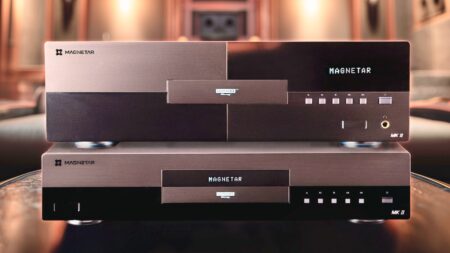
Even unboxing the Magnetar turns into a small high-end ceremony. The UDP800 MKII is encased in a protective fabric cover; a pair of white gloves is also included. This allows you to gently guide the dark brushed surface into place without leaving fingerprints. At the very latest when you lift it out of the box, it becomes clear that Magnetar has a different idea of what a disc player should be than the usual flat plastic boxes. Measuring 43 centimeters wide, 9 centimeters high, just under 30 centimeters deep, and weighing 6.8 kilograms, the UDP800 MKII almost looks like a full-fledged hi-fi component. The highly rigid metal housing features a double-layered chassis design. The drive, power supply, and other components are housed behind additional metal shields designed to keep vibrations, electrical noise, and external magnetic fields at bay.
The power supply is also unusually elaborate for a player. Magnetar uses a custom-built, low-noise 60-watt transformer with two-stage filtering and Rubycon electrolytic capacitors. This, in turn, is housed in a separate metal enclosure. This is the kind of design consistency that you don’t have to search for in a feature list when making a purchase: you can see and feel it in the device itself.
The front panel, by contrast, is almost pointedly understated. Its dark brushed finish looks simple and elegant. Aside from the disc tray and USB port, it features only the classic buttons for open and close, play, pause, stop, and track skip. The monochrome dot-matrix display shows numbers and letters on a single line. It provides reliable information but isn’t suitable for navigating a large music library. That’s what the screen, app, or Roon are for.

Separate Paths for Video and Audio
On the back, the Magnetar shows just how seriously it takes its dual role. The main HDMI output transmits video and audio to a TV, projector, or AV receiver. A second HDMI output is reserved exclusively for audio. This allows the 4K video signal to be sent directly to a modern display, while an older AV receiver handles the audio. At the same time, the Magnetar keeps the signal paths for video and audio separate. The new retiming feature operates specifically on this HDMI audio output.
Via HDMI, the UDP800 MKII outputs multichannel PCM with up to 7.1 channels and 192 kHz, DSD with up to 5.1 channels, or the original bitstream. This also allows Dolby Atmos, Dolby TrueHD, DTS, and DTS-HD Master Audio to be sent to the appropriate decoder. Optical and coaxial S/PDIF outputs are also available, but are naturally limited to a maximum of two-channel PCM up to 192 kHz, as well as Dolby Digital and DTS. For copy protection reasons, they are not permitted to output high-resolution signals from SACD and DVD-Audio.
For the stereo system, the player features both RCA and balanced XLR outputs. The nominal output level is 2.1 volts via RCA and 4.2 volts via XLR. Magnetar specifies a dynamic range and a signal-to-noise ratio of at least 120 decibels each for the analog section. If you listen exclusively to music, you can activate Pure Audio mode using a direct-select button. This disables the HDMI video output so that the video section does not interfere unnecessarily.
Finally, an RS-232 port and support for Control4 and Crestron allow for integration into more sophisticated home theater control systems. As a result, the UDP800 MKII covers the spectrum from classic stereo systems to permanently installed home theaters.

Manual Image Control Instead of Automatic Video Settings
For video output, the Magnetar supports 4K UHD at up to 60 frames per second, HDR10+, Dolby Vision, and 3D. In addition to automatic output, resolution, color space, and color depth can be specified in detail. Options include RGB Video Level, Full RGB, YCbCr 4:4:4 and 4:2:2, as well as 10- or 12-bit. For Dolby Vision, low-latency options are available in addition to the automatic mode; the player can convert HDR content to SDR if needed.
“Source Direct” is particularly interesting for systems with high-end televisions, projectors, or external video processors. In this mode, the Magnetar outputs the image at the medium’s native resolution and leaves the scaling to the downstream device. The numerous options make it clear why this player cannot be covered in a single brochure.
First Impressions
During setup, however, the device’s perfectionism revealed its slightly nerdy side. At first, the connected flat-screen TV showed no picture. It wasn’t until I pressed the “Resolution” button on the remote that the TV and player managed to agree on a common output resolution. For stubborn cases, the manual recommends holding down the button for three to five seconds; the Magnetar will then automatically switch to a compatible resolution.
The lack of a video connection became all the more critical because the smartphone app simply refused to connect to the player. It searched the network unsuccessfully and eventually asked for the IP address. But the UDP800 MKII didn’t even appear in the router’s device list—even though it was connected via a LAN cable.
The Resolution workaround revealed by the Hamburg-based distributor Audio Reference finally opened the way to the on-screen menu and confirmed our initial suspicion: On our test unit—which we had previously used elsewhere—the network function had been disabled. So the LAN cable alone wasn’t enough. Only after activating the Internet connection did the player receive an IP address and become visible to the app. Although the manual lists “Enable” as the default setting, this step may be omitted after a factory reset or on a different unit. You should still check this menu option first if the app, Roon, or your home network cannot find the player.
You could view the ability to completely shut down the network as a perfectionist precaution against interference for pure disc playback. But at the crucial moment, you might also just find it nerdy. The most important thing is to understand the cause. Once that was clear, the issue was resolved—and the rest of the user experience was impressive.


A perfect ten for the remote control
Incidentally, the first—almost analog—hurdle was located at the bottom of the remote control: the author couldn’t get the battery compartment to open on the first try. Once this minor hiccup was overcome, there was hardly anything to complain about with the remote. Despite its many practical direct-selection buttons, it feels neither chaotic nor cluttered. The function groups are logically arranged, frequently used commands can be accessed without having to navigate through the menu, and it even features backlit buttons.
Above all, Magnetar has prioritized readability. The light gray buttons feature black symbols with high contrast. In addition, the functions are labeled in white text on the black casing. Especially for older users—and the author explicitly includes himself in this group—this is far more helpful in a home theater setting than a trendy, minimalist remote control with cryptic pictograms. It gets a solid 10 for that.
The on-screen menu combines a clear structure with attractive background images. It doesn’t overwhelm the user, even though the player can be configured down to the finest details of video and audio output. SACD listeners, for example, can prioritize the stereo, multichannel, or CD layer and choose between DSD and PCM output. For DVD-Audio, you can specify whether the audio or video section of a disc should start. Settings can be exported to a USB storage device and imported again later.
The 64-page German-language user manual in PDF format is particularly welcome. It doesn’t come across as a perfunctory exercise hastily run through a translation tool, but is easy to understand, well-organized, and includes numerous connection diagrams. With such a complex device, this is absolutely essential—and, unfortunately, by no means a given.

The app saves the projector lamp
Operation becomes even more convenient with the Magnetar app for iOS and Android. Once the network setup was complete, the app proved to be well-organized and largely self-explanatory. It replicates the functions of the on-screen menu and remote control on the smartphone and even provides a virtual remote control interface.
This isn’t just a nice extra. After all, anyone who uses the UDP800 MKII exclusively with a projector doesn’t want to have to turn on the projector every time they select an SACD, an audio file, or a setting. With the app, the screen stays off without the user having to rely on the convenient navigation. The few buttons and the single-line front display are then sufficient for everyday disc playback, while the smartphone handles the more advanced functions.


Roon Brings the All-Rounder into the Streaming Age
Following a free firmware update, the UDP800 MKII is now officially Roon Ready. This significantly expands its range of applications without turning it into a run-of-the-mill smart player with a collection of its own streaming apps. As a Roon endpoint, it appears in an existing Roon system and receives music with bit-perfect accuracy over the network. This allows both the local music library and Roon-integrated services such as Qobuz and Tidal to be played back via the Magnetar.
This makes particular sense with a high-end stereo system: The UDP800 MKII now serves not only as a CD and SACD player or a file player for USB and NAS, but also as a central streaming source. It’s easily controlled via the Roon app, while the new analog audio board allows the player to connect directly to a preamp or integrated amplifier. Users who don’t use Roon can continue to use the existing network connections via DLNA, SMB, and NFS.
In this way, the Magnetar has arrived in the present without compromising its true mission. It treats physical media not as a nostalgic afterthought, but as high-quality sources for which the mechanical and electronic effort is still worthwhile. The next part of the review will determine whether this commitment pays off not only in terms of weight, features, and build quality, but also in terms of sound quality.
Audio Test: Gets the Best Out of Every Track
As our name suggests, our reviews focus on sound reproduction. After all, the Magnetar plays a wide range of exciting audio formats and can now also stream via Roon. Even with standard CDs, it delivered an extremely neutral sound with a very rich, deep, and well-defined bass foundation. Added to this is excellent fine detail, combined with the highest level of transparency. Of course, the resolution can be further enhanced with high-resolution recordings, such as DVD-Audio or streamed audio files. But no matter what music we played on the UDP800 MKII, it always delivered the absolute best it could.
Yet the UDP800 MKII never sounded harsh or analytical. It simply offered very, very high resolution and delivered meticulously precise detail in a completely natural, relaxed manner. Delicate bow strokes in classical recordings were imbued with a silky elegance that also characterized the vocals.
The experience was consistently positive even with multichannel movie audio. The finest detail and exemplary neutrality were particularly well-suited to dialogue scenes. And when, as in “Top Gun: Maverick,” for example, there was hissing, rumbling, and crashing from all directions, this audiophile all-purpose powerhouse delivered maximum authenticity.
The three-dimensional spatiality spread throughout the home theater and, combined with the precise positioning of phantom sound sources throughout the room, created an immersive experience that left nothing to be desired. The combination of perfect stereo reproduction and spectacular, yet never artificial, film sound reproduction—paired with equally high-resolution, detailed picture quality—creates an authenticity that draws you deep into the action on the screen.
Magnetar UDP800 MKII: Conclusion and Alternatives
Ever since Oppo withdrew from the multi-purpose player market, Magnetar has confidently filled that gap. The fact that the UDP800 MKII and its two-part big brother, the UDP900 MKII, also rely on MediaTek chipsets underscores Magnetar’s commitment to the highest quality standards. Currently, assuming you have the necessary funds, STEREO GUIDE considers only the larger model—the Magnetar UDP900 MKII — to be a viable alternative. In addition to a USB audio input, it features two separate ES9038PRO DACs for stereo and multichannel playback.
Magnetar UDP800 MKII: Technical Specifications
- Manufacturer’s suggested retail price: 2,000 euros
- Model: Universal disc player for Ultra HD Blu-ray with Dolby Vision and HDR10+, Blu-ray, DVD, DVD-Audio, SACD, as well as CD and CD-R/RW
- Dimensions (W x H x D): 43 x 30 x 9 cm
- Weight: 6.8 kg
- Special Features: Analog audio output: 2-channel RCA and balanced XLR; Digital audio output: Optical, coaxial, HDMI; HDMI audio output: Supports up to 7.1-channel PCM at 192 kHz, 5.1-channel DSD; HDMI video output: UHD 23.976/25/30/50/59.94/60 Hz, 1080i/p, 720p, 576i/p, 480i/p, Source Direct
- For more information, visit: www.audio-reference.de